
Synchronization
The client can work offline and thus has its own copy of data acquired from server. This page describes in detail the workflow of receiveing and sending data synchronization protocols.
Fetching data from server
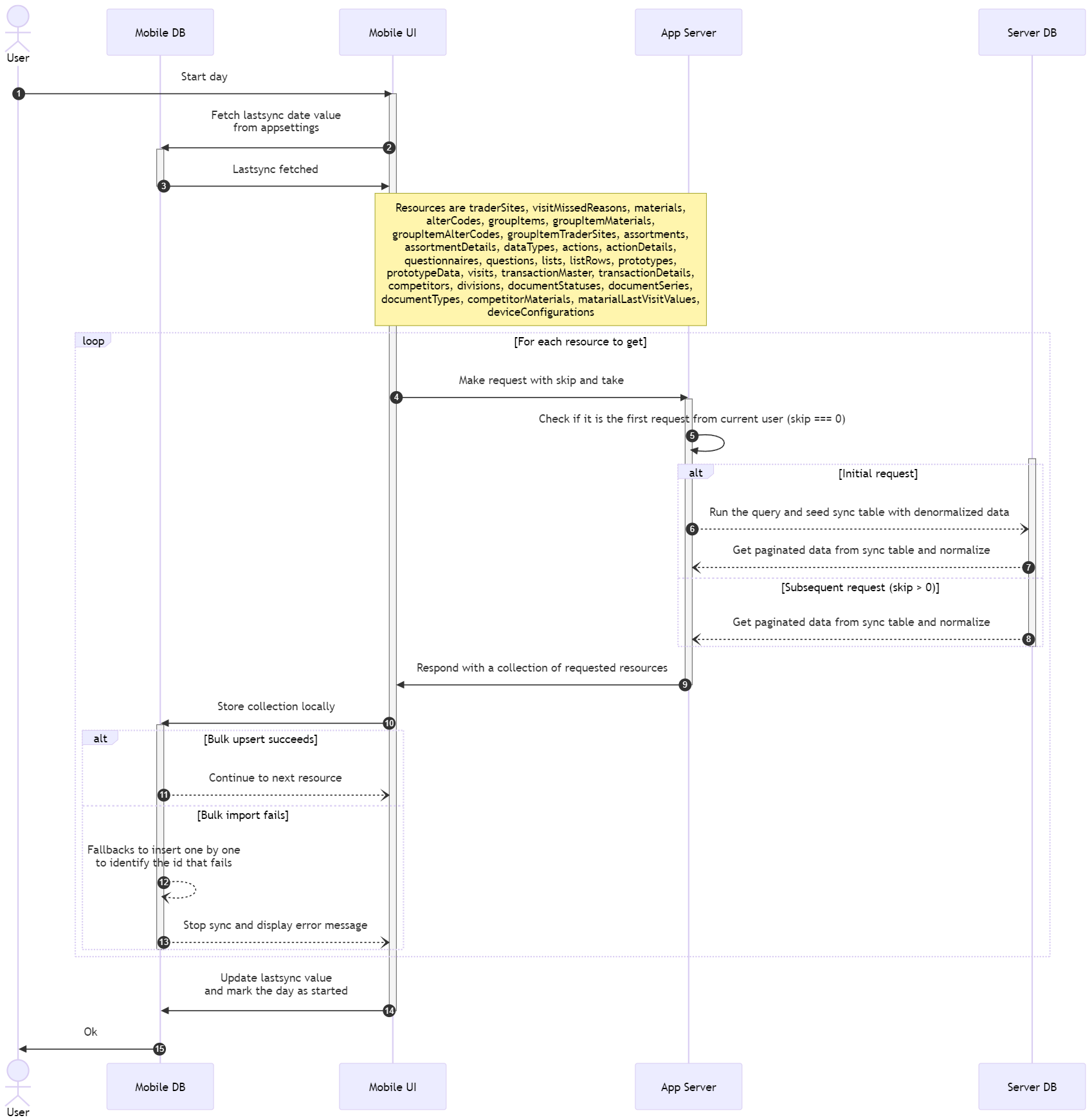
Start day sync
sequenceDiagram
    actor User
    participant sqlite as Mobile DB
    participant mobile as Mobile UI
    participant server as App Server
    participant sql as Server DB

    autonumber

    User->>mobile: Start day

    activate mobile
    mobile->>sqlite: Fetch lastsync date value<br/>from appsettings
    activate sqlite
	sqlite->>mobile: Lastsync fetched
    deactivate sqlite
    Note over mobile, server: Resources are traderSites, visitMissedReasons,
    materials,<br/>alterCodes, groupItems, groupItemMaterials,
    <br/>groupItemAlterCodes, groupItemTraderSites, assortments,
    <br/>assortmentDetails, dataTypes, actions, actionDetails,<br/>questionnaires,
    questions, lists, listRows, prototypes, <br/>prototypeData, visits,
    transactionMaster, transactionDetails,<br/>competitors, divisions,
    documentStatuses, documentSeries,<br/>documentTypes, competitorMaterials,
    matarialLastVisitValues,<br/>deviceConfigurations
    loop For each resource to get
        mobile->>server: Make request with skip and take
		activate server
        server->>server: Check if it is the first request from current user (skip === 0)
        activate sql
        alt Initial request
            server--)sql: Run the query and seed sync table with denormalized data
            sql--)server: Get paginated data from sync table and normalize
        else Subsequent request (skip > 0)
            sql--)server: Get paginated data from sync table and normalize
        end
        deactivate sql
        server->>mobile: Respond with a collection of requested resources
        deactivate server
        mobile->>sqlite: Store collection locally
        activate sqlite
        alt Bulk upsert succeeds
            sqlite--)mobile: Continue to next resource
        else Bulk import fails
            sqlite--)sqlite: Fallbacks to insert one by one<br/>to identify the id that fails
            sqlite--)mobile: Stop sync and display error message
        end
        deactivate sqlite
    end
	mobile->>sqlite: Update lastsync value<br/>and mark the day as started
	deactivate mobile
	sqlite->>User: Ok
Worth noting here is that the trader site photos come along with the trader sites but they are stored in a different table in the client. This is hapenning because the trader sites are being deleted at the end day, but we want to retain their photos to avoid refetching them.
As a future implementation, all the data will be retained locally unless the user descides otherwise. This will allow us to merge the trader sites with their photos locally as well.
Mid day sync
When syncing data on miday we follow the start day protocol but without fetching any visits.
Add new visit
When adding a new visit we sync only the following resources
- TraderSite
- GroupItems
- GroupItemTraderSites
- Assortments
- AssortmentDetails
- Questionnaires
- Questions
- ListRows
- TransactionsMaster
- TransactionsDetails
- Competitors
- CompetitorMaterials
- MaterialLastVisitValues
Sending data to server
End visit
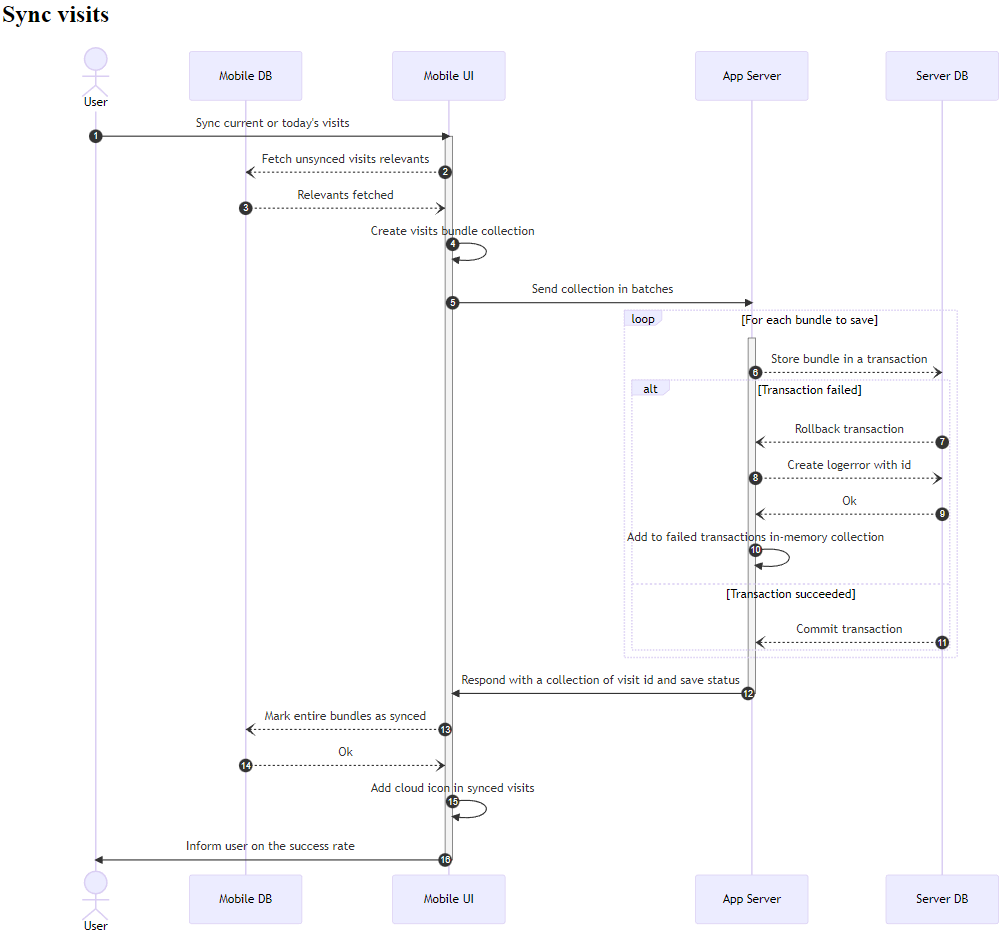
After each visit is completed the user is prompted to send the visit bundle to the server. Alternatively he can send all the unsynced visit bundles back to server.
sequenceDiagram
    actor User
    participant sqlite as Mobile DB
    participant mobile as Mobile UI
    participant server as App Server
    participant sql as Server DB

    autonumber

    User->>mobile: Sync current or today's visits

    activate mobile
    mobile--)sqlite: Fetch unsynced visits relevants
	sqlite--)mobile: Relevants fetched
    mobile->>mobile: Create visits bundle collection
    mobile->>server: Send collection in batches
    loop For each bundle to save
		activate server
        server--)sql: Store bundle in a transaction
        alt Transaction failed
            sql--)server: Rollback transaction
            server--)sql: Create logerror with id
			sql--)server: Ok
            server->>server: Add to failed transactions in-memory collection
        else Transaction succeeded
            sql--)server: Commit transaction
        end
    end
    server->>mobile: Respond with a collection of visit id and save status
	deactivate server
	mobile--)sqlite: Mark entire bundles as synced
	sqlite--)mobile: Ok
	mobile->>mobile: Add cloud icon in synced visits
	mobile->>User: Inform user on the success rate
	deactivate mobile
End day
When the user ends the day he sends the unsynced visit bundles to the server following the above end visit worfklow and also sends all the missed visits with a reason for missing the visit. After a successfull sync with the server all the local data are being deleted except of the following
- TraderSite photos
- Questions
- ListRows
- AppSettings
- Logs